War Room Demo App
1. Quick Start
"Ahead, warp factor one." — Captain Kirk, upon launching a new mission
This guide covers everything you need to get the War Room Demo App up and running, from building the admin console to executing your first simulated incident response. Think of it as your Starfleet Academy primer before you take command of the bridge.
1.1 Prerequisites
| Tool | Version | Purpose |
|---|---|---|
Android Studio |
Hedgehog+ | IDE and Android SDK |
JDK |
17+ | Kotlin/JVM compilation |
Gradle |
8.x (via wrapper) | Build system |
Android Device/Emulator |
API 26+ | Running the admin console |
Kotlin |
2.1.x | KMP + Compose Multiplatform |
1.2 First Launch — Build the Admin Console
Beam Down to the Project
git clone <your-repo-url> war-room-demo-app
cd war-room-demo-app/admin-consoleEngage the Warp Core (Gradle)
./gradlew :composeApp:assembleDebugThe resulting APK will be at:
composeApp/build/outputs/apk/debug/composeApp-debug.apkMaterialize on the Device
adb install composeApp/build/outputs/apk/debug/composeApp-debug.apkOr use Android Studio's Run button to deploy directly to a connected device or emulator.
1.3 Connect to the War Room Server
Once the app launches, navigate to the Settings screen via the bottom navigation bar. You will see three server presets:
| Preset | URL | Use Case |
|---|---|---|
LOCAL |
http://10.0.2.2:8080 |
Emulator connecting to host machine |
STAGING |
https://staging.undercurrent.dev |
Shared staging environment |
CUSTOM |
(user-defined) | Any custom endpoint |
Select your preset, tap CONNECT, and verify the status card shows Connected.
2. Roles & Responsibilities — The Bridge Crew
"A starship is only as good as her crew." Every effective incident response depends on clearly defined roles. We map each War Room role to a Star Trek TOS bridge officer to make the responsibilities intuitive and memorable. — Undercurrent Ops Manual
The War Room system automatically pulls in the right people based on incident severity and escalation policies. Each role has a TOS analogy used throughout the demo and the admin console UI.
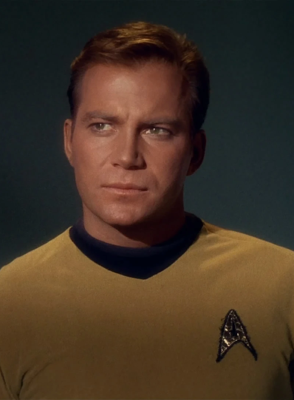
- Acknowledges incoming P1 alerts
- Assigns investigation tasks to specialists
- Makes go/no-go decisions on hotfixes
- Coordinates cross-functional response
- Owns the post-incident review
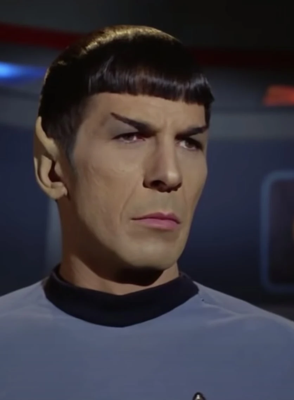
- Runs diagnostic queries and identifies root cause
- Kills problematic queries or connections
- Provides forensic analysis for postmortem
- Validates fixes before production deployment

- Drafts and publishes status page updates
- Coordinates with customer support teams
- Manages executive bridge communications
- Ensures SLA notification requirements are met
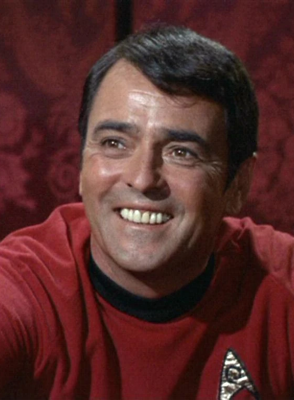
- Pulls infrastructure metrics and traces
- Identifies deployment correlation with incidents
- Builds and tests hotfixes
- Pushes fixes through the deployment pipeline
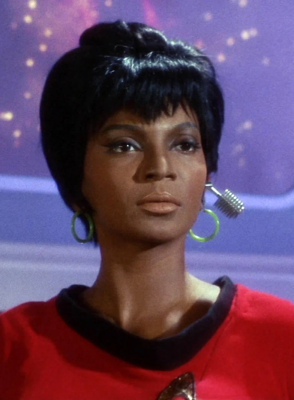
- Manages multi-channel notification routing
- Publishes status page updates on IC approval
- Bridges Slack channels, PagerDuty, and SMS
- Notifies customer support of inbound ticket waves
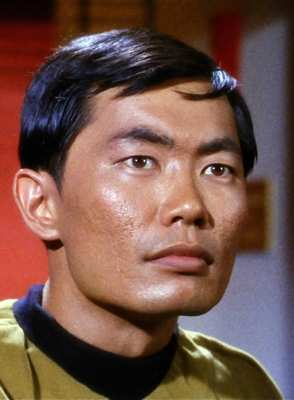
- First to receive automated pages
- Performs initial triage and impact assessment
- Activates escalation if threshold is met
- Maintains system stability during investigation
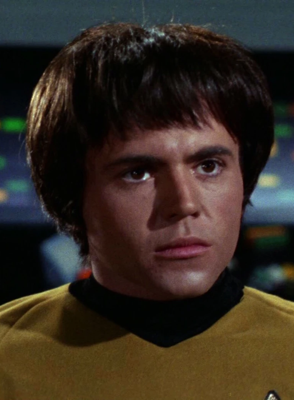
- Monitors live dashboards for secondary failures
- Tracks key metrics (error rates, queue depths, latency)
- Reports metric changes to the IC in real time
- Validates recovery via metric normalization
3. War Room Setup
"All hands, battle stations!" — Standard Red Alert procedure, USS Enterprise
A War Room is automatically created when a P1 or P2 incident is triggered. The system handles group creation, role assignment, and notification routing. Here is the anatomy of a War Room:
3.1 War Room Architecture
3.2 War Room Lifecycle
Red Alert Triggered
Monitoring detects anomaly. Webhook fires to Undercurrent Core. Severity auto-classified based on escalation policy.
Crew to Battle Stations
War Room group created. Roles pulled in based on severity. Signal group established with E2E encryption. Services (PagerDuty, Datadog, Slack) connected.
Assess the Situation
IC takes command. Senior analysts investigate. Metrics flow in real-time. Playbook AI surfaces similar past incidents.
Engage and Resolve
Runbook steps executed. Hotfix developed and deployed. Communications published. Metrics monitored for recovery.
4. Incident Response Flow
"The needs of the many outweigh the needs of the few." — Spock, reminding us why fast incident response matters
The incident response flow follows the NIST SP 800-61 framework adapted for operational incident management. Here is the complete workflow as demonstrated in the War Room demo:
4.1 Incident Flow Diagram
4.2 Key Metrics from the Demo Scenario
| Metric | Value | Note |
|---|---|---|
| Time to Acknowledge (TTAck) | 1m 12s |
IC Sarah Chen acknowledged |
| Time to Resolve (TTR) | 22m 18s |
Full resolution including monitoring window |
| Impacted Users | ~2,400 |
API consumers during outage |
| Failed Transactions | 847 |
All recovered via retry queue |
| Root Cause | ORM connection leak |
v2.4.1 deploy, batch reporting path |
| Severity | P1-CRITICAL → P3 | Auto-downgraded upon resolution |
5. Playbook Configuration
"Computers make excellent and efficient servants, but I have no wish to serve under them." — Spock, on the role of AI in incident response
The War Room Playbook AI surfaces contextual intelligence during incidents. It does not make decisions — it informs the crew. Configuration includes:
5.1 Playbook Components
Historical Incident Matching
The AI indexes resolved incidents and surfaces similar past events with their root causes and resolution steps. In the demo, it matched INC-2847 (Nov 2025) which had an identical ORM connection leak after a deployment.
Runbook Automation
Runbooks are step-by-step remediation procedures. The system activates the appropriate runbook based on incident classification. The demo uses DB-POOL-EXHAUST-01 with four phases: Triage, Containment, Eradication, and Recovery.
Framework Alignment
Each incident phase is mapped to NIST SP 800-61 categories. The Playbook AI annotates the current phase (Preparation, Detection, Containment, Eradication, Recovery, Post-Incident) so the team always knows where they are in the response lifecycle.
5.2 Runbook Step Format
Runbook: DB-POOL-EXHAUST-01

Step 1: TRIAGE
  - Confirm pool exhaustion via metrics
  - Check active connections, wait queue depth
  - Assess connection age distribution

Step 2: CONTAINMENT
  - Kill idle connections > 60s
  - Block new connections from non-critical services
  - Preserve forensic state for post-incident

Step 3: ERADICATION
  - Deploy hotfix (ORM batch connection leak)
  - Verify fix in staging before production push
  - Owner: SRE Lead (Scotty)

Step 4: RECOVERY & MONITORING
  - Monitor pool for 30m post-fix
  - Verify retry queue drains completely
  - Confirm 5xx rate returns to baseline
  - Schedule post-incident review within 48h
6. Integration Setup
"Uhura, open a channel." — Captain Kirk, whenever external communication is needed
The War Room connects to external services automatically upon incident creation. Each integration has a specific purpose in the response workflow:
6.1 Notification Routing
Each team member can receive notifications through multiple channels simultaneously. The system uses a priority cascade:
| Priority | Channel | Use Case |
|---|---|---|
| P1 | SMS + PagerDuty + Slack + Signal | All channels fire simultaneously |
| P2 | PagerDuty + Slack + Signal | Urgent but not emergency |
| P3 | Slack + Signal | Standard notification |
| P4 | Slack only | Informational |
7. Communication Protocols
"Hailing frequencies open, Captain." — Lt. Uhura, ready for anything
7.1 Internal War Room Communication
All war room communication happens through the encrypted Signal group. Messages are structured by role:
| Role (TOS) | Communication Style | Example |
|---|---|---|
| IC (Kirk) | Directives, task assignments, decisions | "I'm taking command. Marcus, pull the metrics." |
| Analyst (Spock) | Data-driven findings, root cause analysis | "Confirmed — 3 long-running queries holding connections." |
| Infra (Scotty) | Status updates on fixes, deployment progress | "Hotfix staged. Tested in staging-east. Pushing to prod." |
| Comms (Uhura) | Customer-facing drafts, stakeholder updates | "Status page updated: Identified and mitigating." |
| Monitor (Chekov) | Live metric readings, recovery confirmation | "Retry queue draining: 1,200 → 340 → 12." |
7.2 External Communication Protocol
Status Page Updates
Status page updates require IC approval before publishing. The Communications Lead (Uhura) drafts the update, and the IC (Kirk) gives the go-ahead. This prevents premature or inaccurate customer-facing messaging.
Executive Bridge
For P1 incidents, the Executive Observer role provides a direct channel to the executive team. They relay impact summaries, ETAs, and resolution status without disrupting the technical response.
7.3 Post-Incident Communication
8. Architecture Reference
8.1 Backend Stack
| Component | Technology | Purpose |
|---|---|---|
| Core | Kotlin/JVM + Ktor | HTTP API, routing, incident engine |
| Database | Exposed ORM + SQLite | Persistence layer |
| Signal Client | signal-client module | E2E encrypted group management |
| Broadcast | broadcast module | Multi-channel notifications |
| Echobot | echobot module | Automated testing responses |
| Webhook Ingest | webhook-ingest module | External alert ingestion |
| Test UI | test-ui module | Browser-based testing interface |
8.2 Admin Console Stack
| Component | Technology | Purpose |
|---|---|---|
| Framework | Kotlin Multiplatform | Shared code across platforms |
| UI | Jetpack Compose (Material 3) | Declarative UI toolkit |
| Theme | Factory Theme Engine (Cybercommand) | Dark ops center aesthetic |
| Architecture | ViewModel + StateFlow | Unidirectional data flow |
| Navigation | Enum-based (AppScreen) | Simple, no Jetpack Navigation |
| Networking | Ktor Client | HTTP calls to backend API |
9. Severity Matrix
| Severity | Name | Criteria | Response Time | TOS Analogy |
|---|---|---|---|---|
| P1 | CRITICAL | Production down, revenue impact, data loss risk | < 5 min | Red Alert — all hands to battle stations |
| P2 | HIGH | Major feature degraded, partial outage | < 15 min | Yellow Alert — shields up, weapons ready |
| P3 | MEDIUM | Minor feature impacted, workaround available | < 1 hour | Standard orbit — routine diagnostic |
| P4 | LOW | Cosmetic, non-blocking, enhancement request | Next business day | Shore leave — address at leisure |
10. Glossary
| Term | Definition |
|---|---|
IC |
Incident Commander — the person who "has the conn" and drives the response |
TTAck |
Time to Acknowledge — interval from alert to first human response |
TTR |
Time to Resolve — interval from alert to confirmed resolution |
War Room |
Auto-created encrypted group for coordinated incident response |
Runbook |
Step-by-step remediation procedure activated by incident type |
Playbook AI |
Intelligence layer that surfaces similar past incidents and recommended actions |
The Conn |
Naval/Starfleet term for command authority — "you have the conn" means you are in charge |
Blast Radius |
The scope of impact — which services, users, and revenue streams are affected |
Red Alert |
P1 severity — all responders paged, war room created automatically |
Bridge Crew |
The assembled team of responders in a war room, mapped to TOS characters |
Hotfix |
Emergency code change deployed directly to production to resolve an incident |
Postmortem |
Blameless review conducted within 48 hours of incident resolution |
UNDERCURRENT // WAR ROOM OPS
"Space: the final frontier. These are the voyages of the starship Enterprise.
Its five-year mission: to explore strange new worlds, to seek out new life and new civilizations,
to boldly go where no man has gone before."
— Star Trek: The Original Series, Opening Narration